
How to Turn an Old Tablet into an Exam Countdown & Pomodoro Study Station
Crush high-stakes exams without smartphone distraction. Repurpose an old tablet or phone into a dedicated exam countdown and Pomodoro study station.
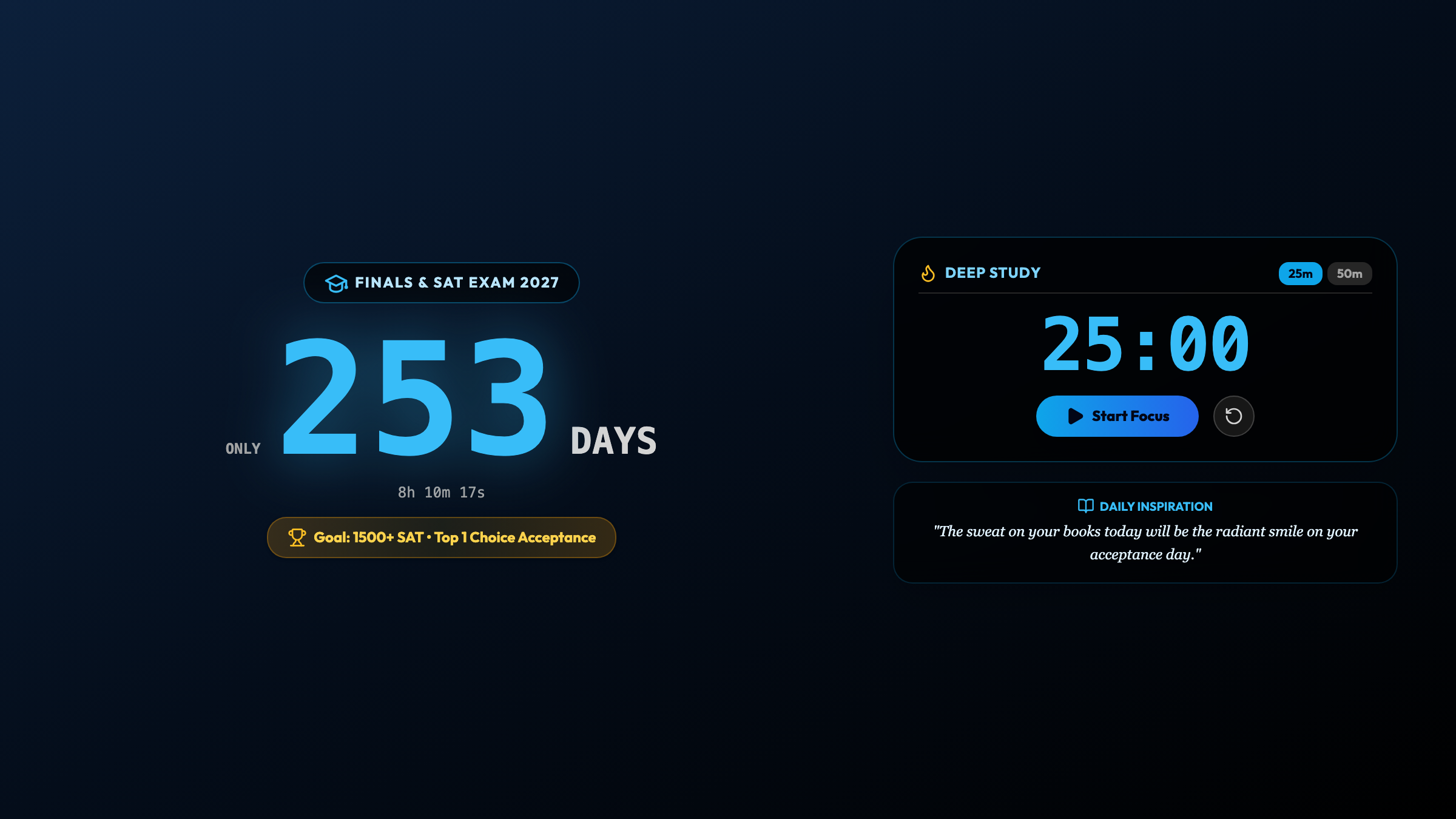
The High-Stakes Exam Trap: Anxiety vs. Distraction
Whether you are preparing for college entrance exams, the Bar exam, CFA levels, USMLE medical boards, or IELTS certifications, the psychological battle of test preparation is universal:
On one hand, the looming test date creates constant underlying anxiety. On the other hand, whenever you sit down to study with your primary phone on the desk, the brain naturally craves escapism. A quick check of a study forum leads to forty minutes of mindless social media scrolling. You feel guilty, your test date draws closer, and panic intensifies.
Psychologists call this the temporal discount dilemma: when an exam date is months away, human brains struggle to connect the urgency of the future milestone with the immediate effort required right now.
The solution used by top-performing students is radical environmental separation: Lock your smartphone in another room, and place an upcycled tablet right on your desk acting as a dedicated Exam Countdown & Pomodoro Study Station.
4 Reasons Why a Dedicated Exam Station Accelerates Revision
By transforming an older iPad or Android tablet with Updrawer Exam Countdown & Focus, you build an uncompromising study command center:
- Unforgiving D-Day Temporal Clarity: Seeing the exact count of days, hours, and minutes remaining until your examination eliminates illusion and procrastination.
- Built-In 25/5 Pomodoro Cadence: Structured 25-minute revision blocks accompanied by gentle metronome ticks keep your brain locked in flow, followed by mandatory 5-minute cognitive rest breaks.
- Daily Stoic & Academic Quotes: Curated words of wisdom rotate on the screen, providing timely psychological reassurance when fatigue sets in.
- Zero Notification Interruption: Because your upcycled tablet does not carry your social accounts, you study in absolute digital sanctuary.
4 Steps to Set Up Your Desk Exam Station
Setting up your dedicated exam dock takes less than three minutes:
Step 1: Prepare Your Old Tablet
Pull that older tablet out of storage. Wipe the screen clean, connect it to your home Wi-Fi network, and plug it into a reliable desk charger.
Step 2: Open Updrawer in Your Browser
Launch Safari or Chrome and navigate directly to https://updrawer.com/app/exam-pomodoro-countdown. The interface loads instantly without requiring any login or password setup.
Step 3: Enter Your Exam Milestone
Type in the title of your examination (e.g., “Bar Exam 2026”, “SAT Day”, “IELTS Band 8”) and select your target test date. The system automatically computes your D-Day countdown and initializes your Pomodoro timer.
Step 4: Add to Home Screen & Position on Desk
Tap the Share button in Safari (or browser menu in Chrome) and select “Add to Home Screen”. This strips away the browser toolbars for an authentic smart device experience. Rest the tablet on an angled stand right beside your study notes.
Proven Revision Strategies for Exam Candidates
- The Phone-in-Another-Room Rule: During intense revision blocks, keep your primary smartphone charging outside your study room. Rely solely on your desk tablet for timekeeping.
- Honor the 5-Minute Break: When the Pomodoro chime rings, step away from the desk, drink a glass of water, and stretch your spine. Do not look at screens during breaks.
- Track Your Completed Study Blocks: Count how many 25-minute Pomodoro cycles you conquer each day to build undeniable confidence before exam morning.
Giving an old tablet a second life as an exam command station protects the environment from e-waste while equipping you with the single most focused revision environment of your academic journey.
Further Reading & Sources
- Cirillo, Francesco. The Pomodoro Technique: The Acclaimed Time-Management System That Has Transformed How We Work. Currency, 2018.
- Ericsson, K. Anders, et al. “The Role of Deliberate Practice in the Acquisition of Expert Performance.” Psychological Review, vol. 100, no. 3, 1993, pp. 363–406.
- United Nations Institute for Training and Research (UNITAR). Global E-waste Monitor 2024. ewastemonitor.info.
Related Articles
I Tried 30 Days of Slow Living With My Desk. Here's What Actually Changed.
A personal experiment inspired by Cal Newport's Digital Minimalism: 30 days of redesigning a workspace to remove friction and distraction. What worked, what didn't, and what stayed.
5 DIY Phone Stands You Can Make Right Now From Things Already in Your Home
You don't need to buy anything. These five clever phone stand ideas use materials most people already have at home — and they work surprisingly well for repurposed desk displays.
Rescue Your Old Phone From the Drawer
Don't let your old device gather dust. Turn your longtime companion into an aesthetic desk clock, calendar & smart display with just one click.