
Turn an Old Phone into a Love & D-Day Anniversary Desk Counter
Celebrate your relationship milestones every single day by repurposing an unused smartphone into an aesthetic couple anniversary clock and D-Day countdown display.
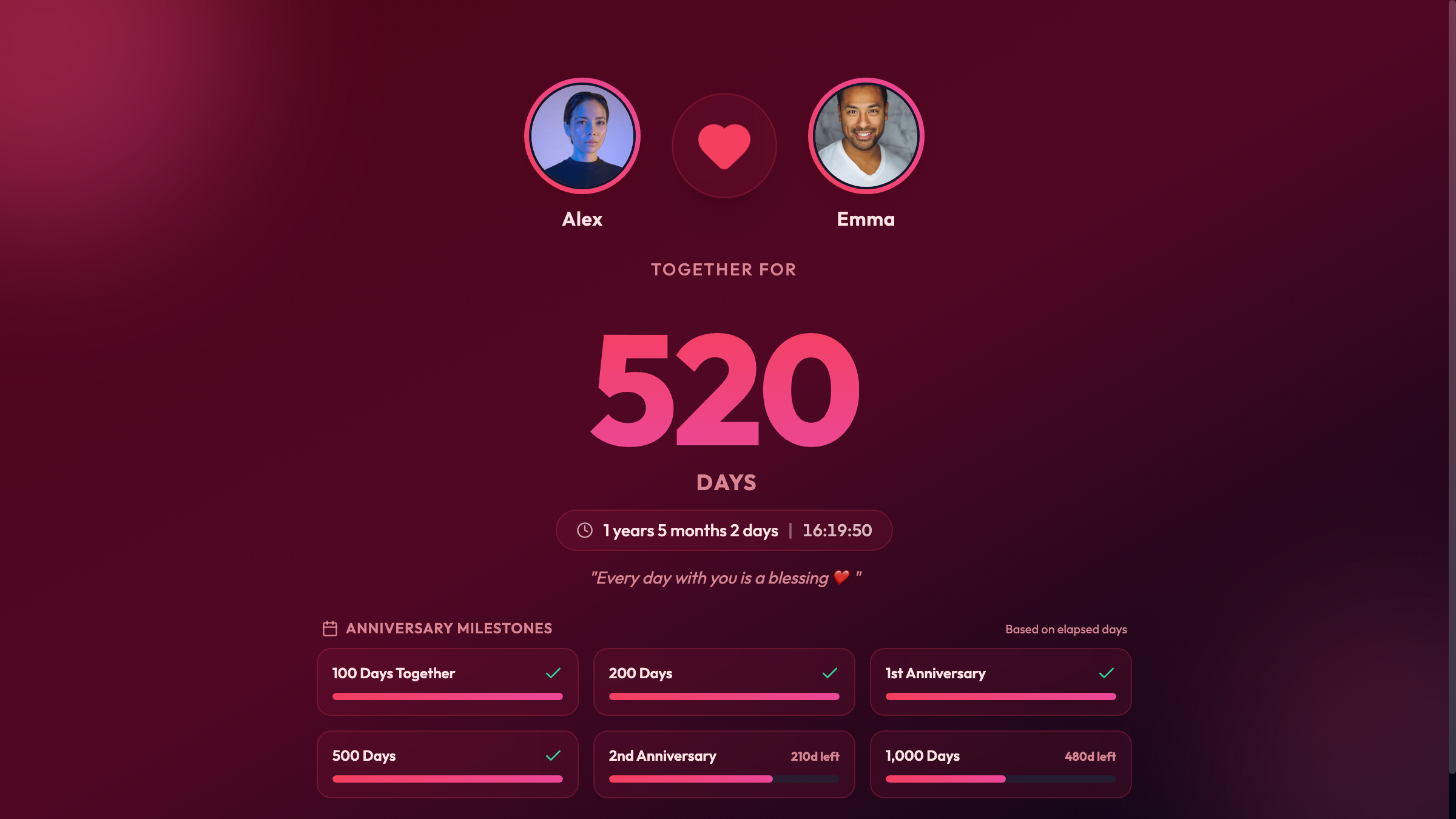
A Gentle Reminder of What Truly Matters in Busy Days
In the whirlwind of daily deadlines, Slack notifications, and endless to-do lists, it is easy for days to blur together. How often do you catch yourself glancing at the clock on your computer monitor and wishing for a warm, grounding presence right beside your keyboard?
Many couples use mobile apps to track their relationship milestones, like the number of days they have been together, upcoming anniversaries, or wedding countdowns. But on your everyday phone, those precious numbers are buried beneath lock screens, social media notifications, and work pings. Every time you unlock your phone to look at a milestone, you risk getting sucked into emails or news feeds.
There is a charming, mindful alternative: repurposing an old, forgotten smartphone into a dedicated Love & D-Day anniversary desk counter.
With an old phone resting peacefully on a small wooden stand on your desk or bedside table, you can enjoy an aesthetic, live visual tribute to your love story without any digital noise.
Why a Dedicated Desk Milestone Counter Feels So Special
1. Zero Distractions, Pure Affection
Your secondary phone does not need a cellular plan, social media apps, or email sync. It is dedicated exclusively to one purpose: celebrating the connection between you and your partner. Every glance provides a quick dopamine boost and a reminder of shared memories.
2. Live Day Count and Upcoming Milestones
Whether you are celebrating Day 100, Day 500, your 1-year wedding anniversary, or counting down the final 30 days until your long-awaited reunion trip to Lake Tahoe, the counter keeps time gracefully. Large, elegant typography displays:
- Total days together (e.g., 732 Days of Love)
- Upcoming D-Day milestones (e.g., D-14 to 2-Year Anniversary)
- Custom avatars or photos representing you and your partner (like Alex & Sarah)
3. Gentle Ambient Aesthetics
Unlike glaring modern monitors, Updrawer’s Love & D-Day Counter features soothing, warm color palettes—from Rose Quartz and Sunset Coral to minimalist Warm Linen and Nightstand Amber. Soft floating particle animations gently pulse in the background, creating a comforting desk ambiance.
4. No App Downloads or Complex Setup
You do not need to hunt down Apple IDs or Google account passwords on a phone you haven’t used in three years. Everything runs directly inside the device’s web browser with zero installation hassle.
Step-by-Step Guide: Creating Your Love & D-Day Desk Companion
Here is how you can transform that neglected phone tucked in your drawer into a beautiful keepsake in under three minutes:
Step 1: Wipe Down and Charge Your Old Phone
Pull out that old iPhone 6s, iPhone X, Samsung Galaxy, or Pixel. Clean the screen with a microfiber cloth, plug in its charging cable, and connect to your home Wi-Fi network.
Step 2: Open the Smart Display in Your Browser
Open Safari or Google Chrome and go straight to: https://updrawer.com/app/relationship-dday-counter
The smart display interface loads instantly, adapting automatically to your phone’s screen size.
Step 3: Configure Your Couple Details
Tap into the settings panel to personalize your counter:
- Names: Enter your names (e.g., Alex & Sarah).
- Anniversary Date: Pick the day your journey began.
- Next Big Milestone: Set your upcoming anniversary, trip, or wedding date for the D-Day countdown.
- Theme Palette: Choose between romantic blush, candlelit glow, or modern dark contrast.
Step 4: Add to Home Screen for Fullscreen Zen
To hide the browser address bar and navigation controls:
- On Safari (iOS): Tap the Share icon (square with arrow) and select “Add to Home Screen”.
- On Chrome (Android): Tap the three dots menu and select “Add to Home screen” or “Install shortcut”.
Tap the new heart icon on your home screen. The display will launch in immersive fullscreen mode.
Step 5: Place on a Wooden Stand
Set your newly minted counter on a small wooden or brass stand next to your keyboard, coffee mug, or nightstand. Keep the charging cable plugged in so the display remains gently illuminated throughout your workday.
Thoughtful Ideas to Make It Even More Meaningful
- Long-Distance Relationships: When you and your significant other are living in different cities or time zones, having identical upcycled displays on both of your desks creates an invisible, heartwarming bridge.
- Anniversary Surprise Gift: Instead of buying another generic gadget, set up an upcycled phone with your couple photos and milestone date already loaded, wrap it in a kraft paper gift box with a handmade wooden stand, and present it as a living anniversary keepsake.
- Bedside Nightstand Mode: Dim the screen brightness at night and let the warm clock softly illuminate the room without jarring blue light.
Give that old device in your drawer a meaningful second life—and keep love right where you can see it.
Further Reading & Inspiration
- Digital Minimalism and Environmental Impact, GSMA Mobile Net Zero Report 2026.
- Micro-Moments of Gratitude in Daily Workspaces, Frontiers in Psychology Research.
- Repurposing Consumer Hardware for Mindful Living, Instructables Tech Projects.
Related Articles
I Tried 30 Days of Slow Living With My Desk. Here's What Actually Changed.
A personal experiment inspired by Cal Newport's Digital Minimalism: 30 days of redesigning a workspace to remove friction and distraction. What worked, what didn't, and what stayed.
5 DIY Phone Stands You Can Make Right Now From Things Already in Your Home
You don't need to buy anything. These five clever phone stand ideas use materials most people already have at home — and they work surprisingly well for repurposed desk displays.
Rescue Your Old Phone From the Drawer
Don't let your old device gather dust. Turn your longtime companion into an aesthetic desk clock, calendar & smart display with just one click.