
How to Turn an Old Phone into a Dedicated Desk Habit Tracker & Streak Grid
Transform an unused smartphone into a distraction-free desk habit tracker. Build lasting daily routines with a persistent visual streak grid right on your workspace.
The Hidden Flaw in Modern Habit Apps
If you have ever tried to establish a new morning or workday routine using a smartphone app, you are familiar with the paradox: the very device intended to build your self-discipline is also your biggest source of distraction.
You sit down at your workspace intending to check off your morning reading or hydration habit. You unlock your phone, only to see three unread Slack pings, an urgent email banner, and an Instagram badge. Twenty minutes later, you have replied to messages and browsed social feeds, while your actual habit remains uncompleted.
According to behavioral research from the Stanford Behavior Design Lab, the single most reliable trigger for consistent human action is an obvious, friction-free physical cue in your immediate environment. When an intention is hidden behind phone lock screens and app icons, it quickly slips out of mind.
By upcycling an old, unused smartphone tucked away in your drawer into a dedicated desk habit tracker, you create a permanent, non-intrusive command center that stays visible throughout your workday.
Why a Dedicated Desk Display Transforms Habit Consistency
A dedicated desktop habit display does what phone apps cannot: it stays open, silent, and visible 100% of the time.
- Zero Notification Hijacking: Without SIM cards, chat messengers, or push alerts, your upcycled screen serves only one noble purpose: celebrating your daily progress.
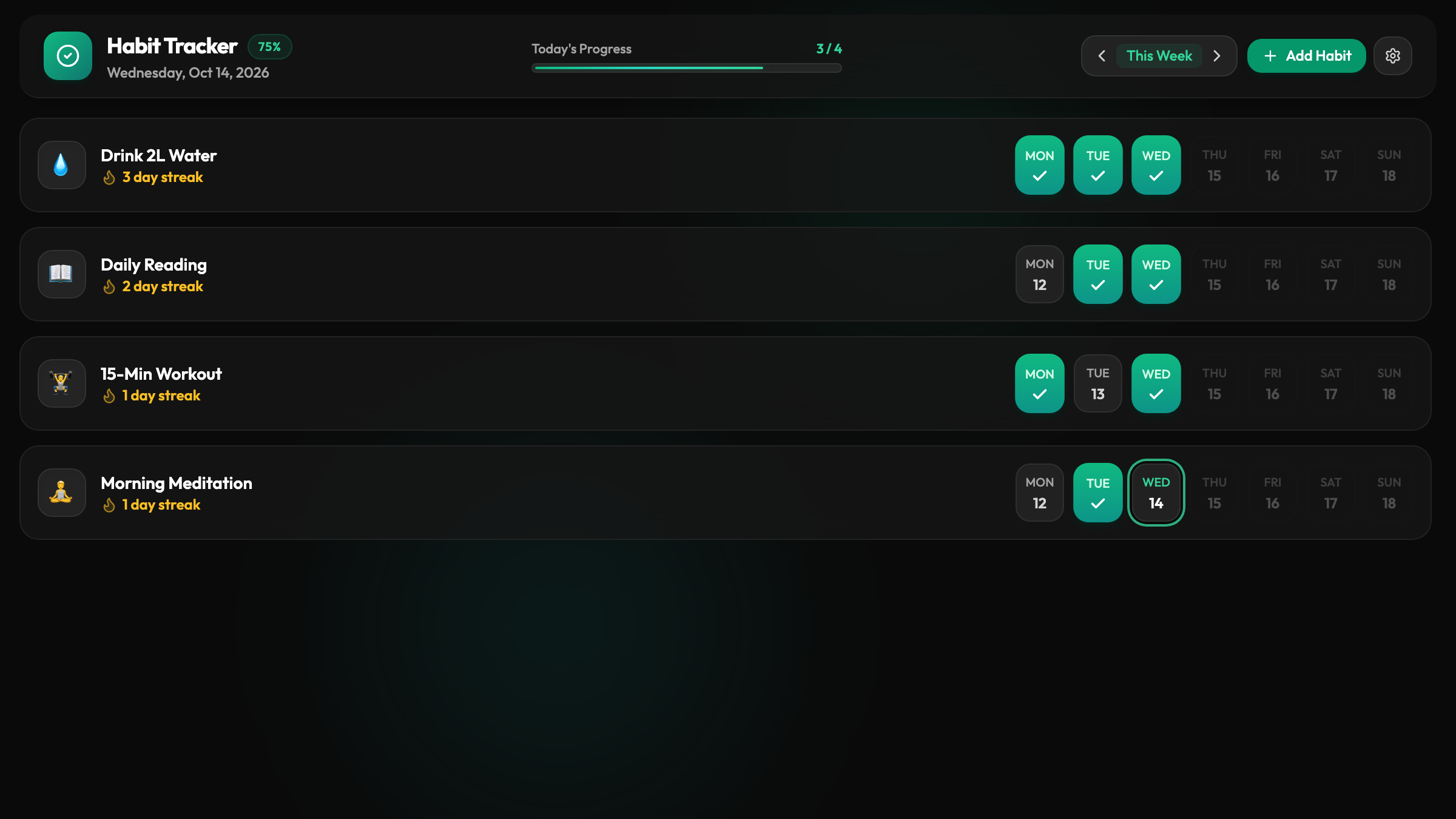
- The Power of the Visual Streak Grid: Seeing your streak counter grow and your weekly grid fill up activates the psychological “endowed progress effect.” You protect your streak because you see it every single hour.
- Friction-Free One-Tap Check-Ins: Whenever you complete a focus block or drink a glass of water, a single tap on the desk screen records your achievement instantly.
- Instant Browser Access: You do not need to remember outdated Apple IDs or Google account passwords. The interface runs straight through your web browser with zero app installation.
How to Set Up Your Desk Habit Tracker in 4 Steps
Setting up your smart habit station takes less than three minutes using the Updrawer Habit Tracker.
Step 1: Prepare Your Device
Dust off that old iPhone, iPod Touch, or Android phone. Plug it into a low-wattage charging cable on your desk and connect it to your home Wi-Fi network.
Step 2: Open the Smart Display in Your Browser
Launch Safari (on iOS) or Chrome (on Android) and head to https://updrawer.com/app/habit-tracker. The clean habit grid loads instantly, without requiring login credentials or credit cards.
Step 3: Configure Your Daily Routines
Customize your habits to reflect your core priorities:
- 25-minute Deep Focus Sprint
- 500ml Water Glass
- Posture Check & Standing Stretch
- 15-minute Skill Reading
- End-of-Day Workspace Reset
Each item comes with its own visual icon, daily checkbox, and historical streak counter.
Step 4: Add to Home Screen & Mount
To eliminate the browser URL bar, tap the Share button in Safari (or the three-dot menu in Chrome) and choose “Add to Home Screen”. Tap the new icon to run in clean, immersive full-screen mode. Set the phone on a compact wooden or aluminum stand right next to your primary monitor.
3 Pro-Tips for Long-Term Routine Mastery
- Keep It to 3 to 5 Core Habits: Do not overload your grid with twenty aspirational tasks. Focus on a tight set of keystones that anchor your day.
- Enable Nightstand Dimming: When evening comes, toggle dark mode so your desk remains calm, restful, and glare-free.
- Leverage Habit Stacking: Link each check-in to an existing physical action (for instance, check off your water tracker right after sitting down with your morning coffee).
Giving an old phone a second life as a purposeful desk companion reduces electronic waste while creating a calmer, more deliberate workspace.
Further Reading & Sources
- Clear, James. Atomic Habits: An Easy & Proven Way to Build Good Habits & Break Bad Ones. Avery, 2018.
- Fogg, B.J. Tiny Habits: The Small Changes That Change Everything. Houghton Mifflin Harcourt, 2019.
- Mark, Gloria. Attention Span: A Groundbreaking Way to Restore Balance, Happiness and Productivity. Hanover Square Press, 2023.
Related Articles
I Tried 30 Days of Slow Living With My Desk. Here's What Actually Changed.
A personal experiment inspired by Cal Newport's Digital Minimalism: 30 days of redesigning a workspace to remove friction and distraction. What worked, what didn't, and what stayed.
5 DIY Phone Stands You Can Make Right Now From Things Already in Your Home
You don't need to buy anything. These five clever phone stand ideas use materials most people already have at home — and they work surprisingly well for repurposed desk displays.
Rescue Your Old Phone From the Drawer
Don't let your old device gather dust. Turn your longtime companion into an aesthetic desk clock, calendar & smart display with just one click.