
Turn an Old Phone into a Black Friday Deal Radar Clock & Shopping Wishlist Hub
Transform an unused smartphone into a dedicated Black Friday & Cyber Monday sale radar clock with live countdowns, target price wishlists, and flash sale alerts.
The Chaos of Holiday Super Sales
Every November and December, the retail world erupts into an adrenaline-fueled storm of promotional banners, limited-time countdowns, and midnight flash sales. From Black Friday and Cyber Monday to seasonal holiday clearances, retailers deploy sophisticated psychological triggers designed to generate urgency and panic-buying.
When shopping from a single laptop or primary phone, keeping track of everything becomes exhausting: dozens of browser tabs are open, coupons expire in seconds, and impulse purchases creep in when prices appear artificially discounted. Meanwhile, you likely have an older smartphone sitting unused in a desk drawer—a device with a vibrant display that could easily act as your tactical shopping companion.
By repurposing that retired phone into a dedicated Black Friday Deal Radar Clock, you gain an invaluable strategic command station right beside your keyboard.
What Makes the Deal Radar Display a Shopper’s Secret Weapon
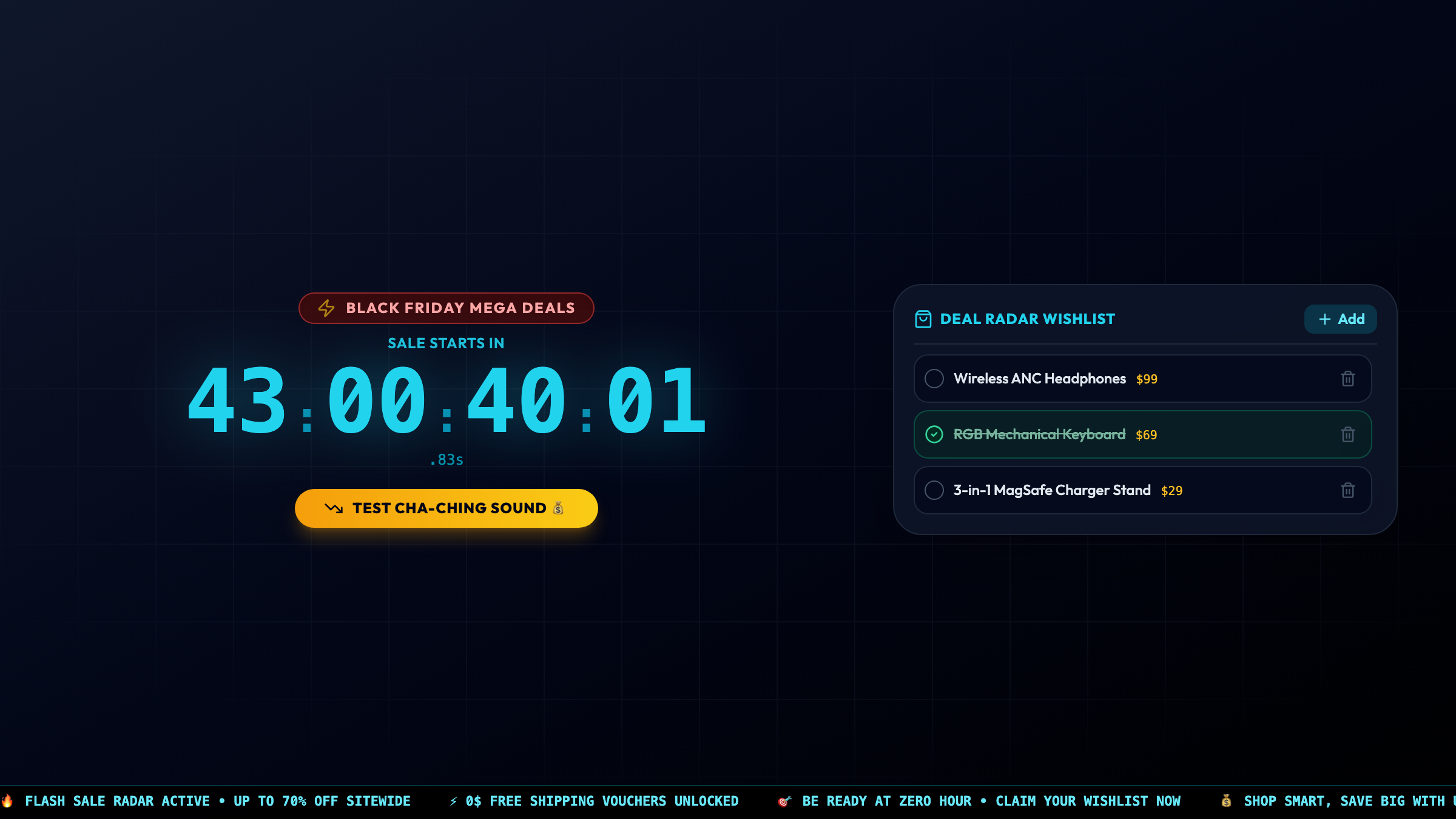
Launching the Deal Radar Countdown on Updrawer converts your old device into a high-visibility shopping tactical display:
- Precision Countdown to Zero-Hour: Real-time second-by-second countdowns to official sale drop times for Black Friday, Cyber Monday, 11.11 Singles Day, 12.12 Mega Sales, or Midnight Flash drops. You will never miss the exact second high-value vouchers unlock.
- Interactive Target Price Wishlist Tracker: Pre-register items you genuinely need (e.g., noise-canceling headphones, mechanical keyboards, monitor arms) along with their current price and target strike price. When a deal is locked in, check off the item with a satisfying tap.
- Pulsing Neon Radar Sweep: An energetic radar animation sweeps across the display, keeping your eyes alert and giving your shopping desk the feel of a tactical command center.
- Live Deal Strategy Ticker: An automated ticker shares practical shopping reminders: “Shop smart, save big”, “Double-check historical price trackers before checkout”, and “Claim free shipping vouchers before midnight”.
- Zero-Hour Audio Alert Chimes: Subtle acoustic pulses alert you as the countdown enters its final five minutes, giving you ample time to refresh checkout pages.
4-Step Setup: Building Your Shopping Command Center
You can have your deal radar running in under two minutes:
Step 1: Prepare Your Device
Retrieve your older smartphone, plug it into power so the screen stays illuminated throughout your shopping sprint, and connect to Wi-Fi.
Step 2: Open Updrawer in the Browser
Open Safari or Chrome and navigate directly to:
https://updrawer.com/app/deal-radar-countdown
The page loads immediately with zero app store installs or permission prompts.
Step 3: Configure Your Wishlist & Target Event
Tap the settings drawer to select your upcoming event (e.g., Black Friday or Cyber Monday). Input 2–4 priority items you plan to hunt for, along with their maximum target budget.
Step 4: Add to Home Screen & Position by Your Laptop
Tap the share icon and select “Add to Home Screen” to hide browser address bars. Rest the phone on a compact desk dock directly beside your laptop or monitor so you can glance at target prices while browsing merchant catalogs.
The Behavioral Science of the Secondary Deal Display
Behavioral economists often note that online impulse buying spikes when consumers feel overwhelmed by decision fatigue and countdown pressure. Having your shopping wishlist and target prices permanently visible on a separate physical screen creates a psychological grounding effect.
Instead of getting swept up in flash sales for items you never wanted, your secondary screen quietly reminds you: Did you secure the keyboard at $69? If not, do not wander into random discounts. You stay disciplined, save hundreds of dollars, and turn chaotic holiday sales into an organized, satisfying victory.
Frequently Asked Questions
Do I need to download an app or provide credit card info?
No. Updrawer is 100% free, operates strictly in your standard web browser, and never handles payments or requests personal financial information.
How does the wishlist tracker help prevent impulse purchases?
Setting predetermined price targets on a visible secondary screen acts as an objective barrier against impulse buying and artificial discounts during frantic sales.
Can I toggle between different shopping holidays?
Yes. With a single tap in the settings dock, you can switch between Black Friday, Cyber Monday, 11.11 Singles Day, 12.12 Mega Sale, and generic Midnight Flash drops.
Further Reading & Smart Shopping Research
- Ariely, D. (2008). Predictably Irrational: The Hidden Forces That Shape Our Decisions. HarperCollins (Chapter 4: The Cost of Free and Artificial Urgency).
- Consumer Reports (2024). Black Friday and Cyber Monday Price Tracking: Analyzing Real vs Artificial Retail Discounts. consumerreports.org
- National Retail Federation (2023). Holiday Consumer Spending Trends and Digital Shopping Behaviors.
Related Articles
I Tried 30 Days of Slow Living With My Desk. Here's What Actually Changed.
A personal experiment inspired by Cal Newport's Digital Minimalism: 30 days of redesigning a workspace to remove friction and distraction. What worked, what didn't, and what stayed.
5 DIY Phone Stands You Can Make Right Now From Things Already in Your Home
You don't need to buy anything. These five clever phone stand ideas use materials most people already have at home — and they work surprisingly well for repurposed desk displays.
Rescue Your Old Phone From the Drawer
Don't let your old device gather dust. Turn your longtime companion into an aesthetic desk clock, calendar & smart display with just one click.