
How to Turn an Old Phone into an Ambient Vocabulary Desk Clock
Master new languages effortlessly through passive micro-learning. Upcycle an unused phone into an ambient desk clock that displays vocabulary flashcards throughout your workday.
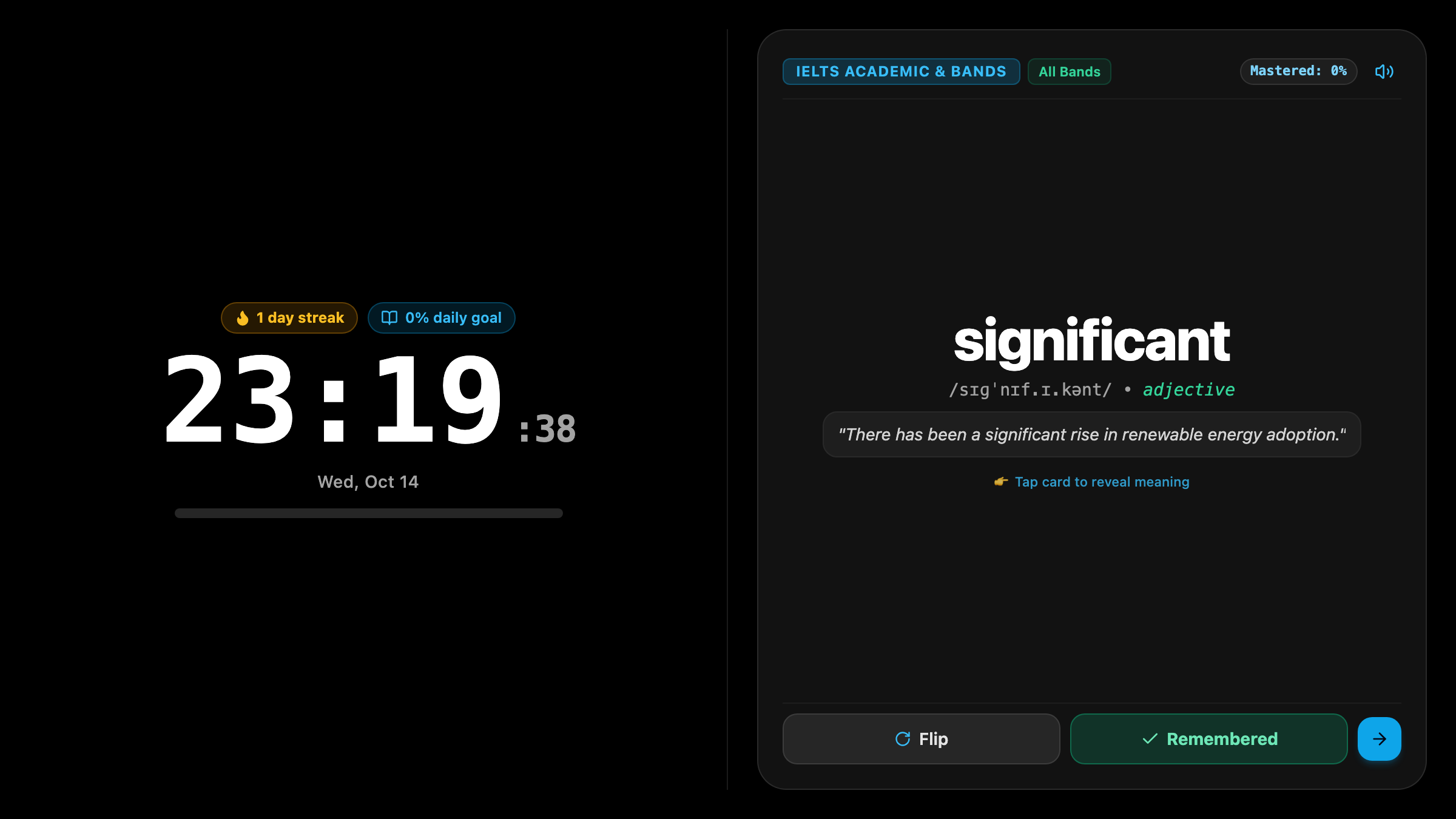
The Exhaustion of Traditional Flashcard Cramming
Anyone who has tried to expand their vocabulary for career growth, IELTS, TOEFL, or university exams knows the familiar cycle: you download a spaced repetition flashcard app with grand intentions, promising yourself you will drill 50 words every evening.
For four days, it works. But by Thursday, after eight hours of demanding meetings and deadlines, the thought of sitting through 45 minutes of tedious flashcard drills feels like torture. You skip one day, then two, and within two weeks, the app sits unopened, weighed down by an intimidating pile of overdue review cards.
The issue is not your willpower: it is that active memorization after an exhausting workday creates intense cognitive friction.
Meanwhile, consider a surprising reality of your daily workstation: you look at the clock on your desk between 40 and 60 times every single day.
What if every time your eyes naturally wandered to check the time, you absorbed one high-yield vocabulary word, complete with its phonetic guide, definition, and practical usage sentence?
The Magic of Ambient Passive Micro-Learning
By turning an old smartphone or small tablet into a dedicated Updrawer Vocab Clock, you bring language learning into your peripheral vision through low-stress incidental exposure.
- Effortless Subconscious Repetition: Instead of fighting through grueling study sessions, you encounter 40 to 50 vocabulary glimpses throughout your workday without breaking your concentration.
- Context-Rich Word Cards: Each card displays the clean digital clock alongside the target term, phonetic transcription, part of speech, clear definition, and an illustrative sentence.
- Curated Exam & Professional Decks: Easily toggle between Oxford 3000 foundational words, IELTS Academic, SAT, TOEFL, or Business Communication.
- Interactive Quick-Quizzes During Breaks: Whenever you take a coffee sip or stretch, a single tap turns your clock into a fun 30-second multiple-choice memory challenge.
4 Steps to Set Up Your Desk Vocab Clock
Transforming your unused device takes just two minutes:
Step 1: Prepare Your Device
Take an older phone or small tablet out of retirement. Wipe down the screen, plug it into a charging dock, and connect to Wi-Fi.
Step 2: Open the Smart Display in Your Browser
Launch Safari (iOS) or Chrome (Android) and head to https://updrawer.com/app/vocab-clock. The elegant clock and flashcard interface appears immediately.
Step 3: Choose Your Deck and Card Timing
Select your learning focus (such as IELTS Academic or Daily Conversation). Set the card rotation timing to your liking—such as switching terms every 5 minutes or updating on every hour.
Step 4: Add to Home Screen & Mount on Your Desk
Tap the browser Share menu and select “Add to Home Screen” to eliminate browser address bars for a clean smart display aesthetic. Place the phone on a compact wooden stand right beneath or beside your computer screen.
3 Strategies for Maximum Vocabulary Retention
- Read the Example Sentence Out Loud: When taking a micro-break, softly vocalize the sample sentence on the screen. Engaging your auditory vocal loop drastically boosts retention.
- Match Deck Difficulty to Your Current Level: If you are beginning your journey, start with common everyday idioms before tackling dense academic vocabulary.
- Celebrate Your Daily Streak: Glancing at the bottom corner of the display to see your learning streak counter climb keeps motivation high day after day.
Repurposing forgotten electronics into dedicated desktop learning stations turns idle hardware into your personal linguistic tutor—one quiet minute at a time.
Further Reading & Sources
- Krashen, Stephen. Principles and Practice in Second Language Acquisition. Pergamon Press, 1982.
- Nation, I.S.P. Learning Vocabulary in Another Language. Cambridge University Press, 2013.
- Newport, Cal. Deep Work: Rules for Focused Success in a Distracted World. Grand Central Publishing, 2016.
Related Articles
I Tried 30 Days of Slow Living With My Desk. Here's What Actually Changed.
A personal experiment inspired by Cal Newport's Digital Minimalism: 30 days of redesigning a workspace to remove friction and distraction. What worked, what didn't, and what stayed.
5 DIY Phone Stands You Can Make Right Now From Things Already in Your Home
You don't need to buy anything. These five clever phone stand ideas use materials most people already have at home — and they work surprisingly well for repurposed desk displays.
Rescue Your Old Phone From the Drawer
Don't let your old device gather dust. Turn your longtime companion into an aesthetic desk clock, calendar & smart display with just one click.