
Repurpose an Old Tablet into an Aesthetic Nursery Baby Clock & Sleep Station
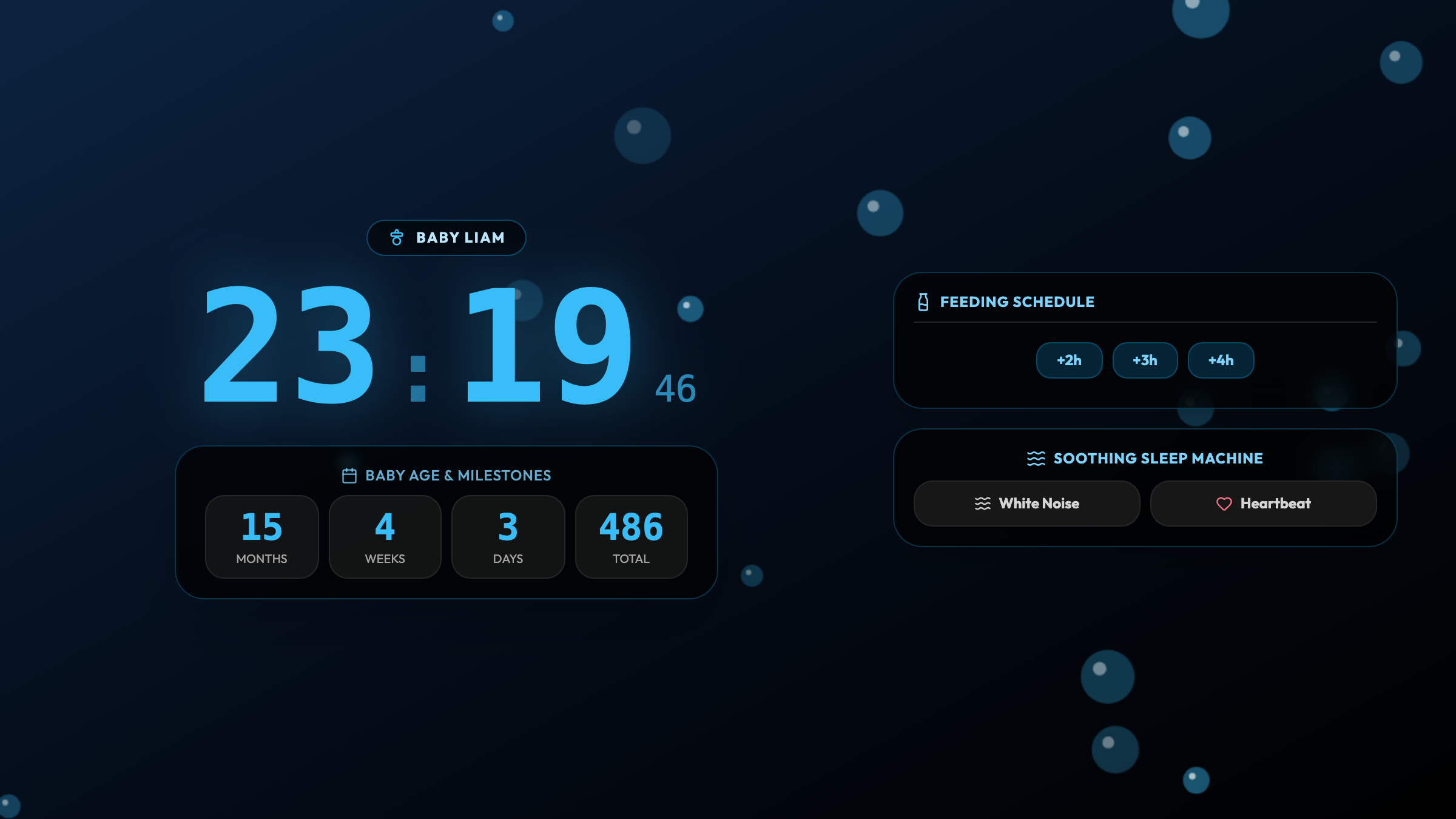
Turn an unused iPad or Android tablet into a soothing nursery bedside smart clock with baby milestone tracking, amber nightlight, and built-in white noise.
Surviving the Night Shifts: The Nursery Screen Dilemma
Every new parent knows the feeling of creeping into the nursery at 3:15 AM. You need to check the time, remember when the last feeding occurred, and keep just enough light in the room to change a diaper without tripping over toys.
Reaching for your everyday smartphone during these late-night checks is fraught with problems:
- Harsh blue screen glares startle your drowsy baby wide awake.
- An accidental phone notification chime can shatter a fragile 45-minute bedtime battle.
- Looking at your phone exposes you to incoming emails and news feeds that sabotage your own ability to fall back asleep.
Commercial baby sound machines and specialized nursery smart clocks often cost anywhere from $80 to $150, cluttering your dresser with single-use plastic gadgets.
Instead of buying another electronic gadget, you can breathe new purpose into an old iPad or forgotten Android tablet sitting dormant in your cabinet. With Updrawer’s Baby Sleep & Milestone Tracker, that spare screen becomes an elegant, soothing, all-in-one nursery assistant.
4 Reasons an Upcycled Tablet Is the Ultimate Nursery Hub
1. Calming Amber Glow with Zero Melatonin Disruption
Scientific studies published in sleep medicine emphasize that short-wavelength blue light suppresses melatonin production in infants and adults alike (Source: Columbia Psychiatry & Sleep Research).
The Baby Sleep Tracker features a carefully tuned amber nightlight mode. It casts a gentle, candlelit glow that allows parents to see clearly while soothing the baby back to sleep.
2. Soothing White Noise and Lullabies Built Right In
Forget buying a separate white noise speaker. Updrawer streams continuous, calming audio loops directly through the tablet’s built-in speakers:
- Gentle Summer Rain: Soft raindrops pattering on leaves.
- Rhythmic Ocean Swell: Deep, meditative coastal waves.
- Womb Heartbeat: Familiar, reassuring rhythms that soothe newborns.
- Soft Music Box Lullaby: Classic bedtime melodies with adjustable gentle fade-out.
3. Automatic Age Counter & Feed Reminders
Babies grow astonishingly fast. The screen displays a heartwarming live age tracker, celebrating every step of the journey:
- “Liam is 3 months and 12 days old today”
- An intuitive, one-tap timer for nursing or bottle feeding intervals (e.g., Next feed in 2h 15m).
- Clear, soft-glow digital time that is easy to read across the room without squinting.
4. Zero Notification Hazards
Because this secondary tablet is dedicated entirely to the nursery, you can disconnect messaging accounts and disable system alerts. There are no surprise ringtones, vibrations, or pop-ups to disrupt your baby’s peaceful slumber.
Step-by-Step Setup: Building Your Nursery Display in 3 Minutes
Step 1: Wipe and Prep Your Old Tablet
Retrieve your old iPad (even an iPad Air 2 or iPad Mini) or Android tablet. Plug it into its charging cable, ensure it is connected to home Wi-Fi, and dim the hardware brightness slider to a comfortable baseline.
Step 2: Open the Smart Display in Safari or Chrome
Launch the web browser and visit: https://updrawer.com/app/baby-milestone-tracker
The interface adapts immediately to landscape or portrait orientation on your tablet screen.
Step 3: Personalize Your Baby’s Hub
Tap the settings gear to customize:
- Baby’s Name & Birth Date: See their exact age count in days, weeks, and months.
- Nightlight Color: Choose between Warm Amber, Peach Sunset, or Midnight Lavender.
- Soundscape: Select your favorite white noise track and set an optional auto-sleep timer.
Step 4: Add to Home Screen & Position Safely
- On iOS: Tap Share $\rightarrow$ “Add to Home Screen”.
- On Android: Tap Menu $\rightarrow$ “Add to Home Screen”.
Launch the icon in distraction-free fullscreen mode. Place the tablet securely on a sturdy changing table or nursing nightstand, at least 3 feet away from the crib and out of reach of tiny hands.
Helpful Nursery Tips for Tired Parents
- Cable Safety: Always secure charging cables behind furniture with adhesive clips so cords never dangle near the crib.
- Screen Awake Mode: Updrawer automatically keeps the screen awake while active, but you can turn the brightness down to minimum for an ultra-subtle nightlight glow.
- Tummy Time Fun: During daytime play, switch the display to daytime milestone mode to capture sweet photo memories of your baby’s monthly milestones.
Give your old tablet a gentle, loving role in your family’s daily routine—and bring peaceful nights back to your nursery.
Further Reading & Infant Sleep Research
- Infant Sleep Environments and Light Exposure, Columbia Psychiatry & Pediatric Sleep Guidelines.
- Benefits of Continuous White Noise for Infant Sleep Onset, Frontiers in Psychology.
- Electronics Repurposing for Sustainable Households, GSMA Mobile Net Zero 2026.
Related Articles
I Tried 30 Days of Slow Living With My Desk. Here's What Actually Changed.
A personal experiment inspired by Cal Newport's Digital Minimalism: 30 days of redesigning a workspace to remove friction and distraction. What worked, what didn't, and what stayed.
5 DIY Phone Stands You Can Make Right Now From Things Already in Your Home
You don't need to buy anything. These five clever phone stand ideas use materials most people already have at home — and they work surprisingly well for repurposed desk displays.
Rescue Your Old Phone From the Drawer
Don't let your old device gather dust. Turn your longtime companion into an aesthetic desk clock, calendar & smart display with just one click.