
How to Repurpose an Old Phone into an Aesthetic Dual-Timezone World Clock
Stay connected across continents without doing mental timezone math. Turn an old smartphone into an aesthetic dual-timezone desk clock for remote work and loved ones.
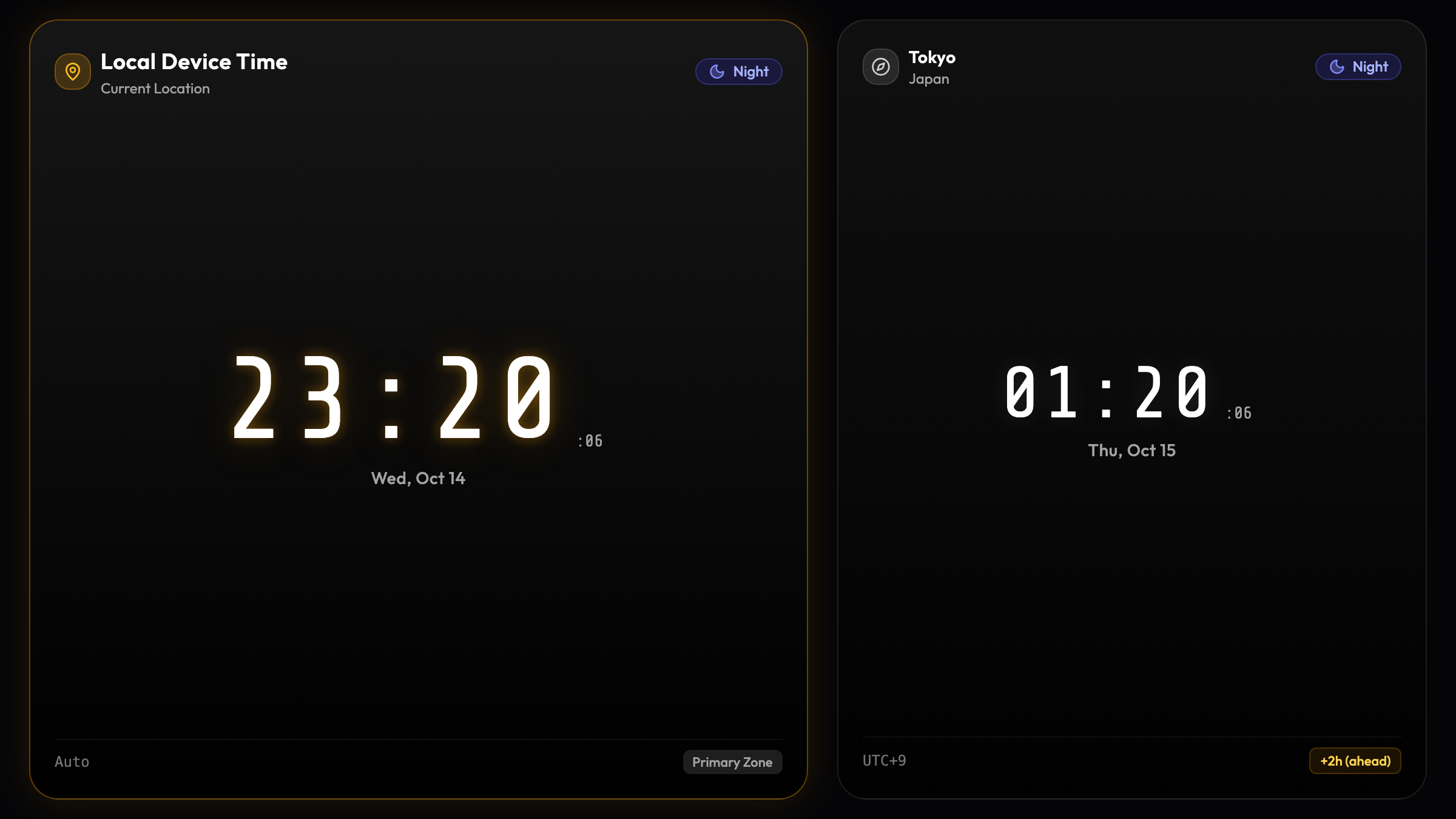
The Friction of Living Across Timezones
If you work remotely with international clients, collaborate with colleagues spread between San Francisco, London, and Tokyo, or have a partner studying abroad, you are familiar with the daily mental gymnastics:
“It is 3:00 PM here in London… that means it is 7:00 AM in California, but wait, did they change for Daylight Saving Time last weekend? Can I send this message now, or will their phone buzz on their nightstand at 4:00 AM?”
According to remote work studies from the Harvard Business Review, asynchronous communication friction—particularly inadvertent out-of-hours messages—is a leading cause of digital burnout among global teams.
While you can always pull out your phone or open another browser tab to check the world clock, doing so breaks your focus in the middle of writing code, drafting proposals, or hopping on Zoom calls.
The simplest, most elegant solution is sitting right in your desk drawer: Repurpose an unused smartphone into an always-on, aesthetic Dual-Timezone World Clock.
Why an Upcycled World Clock Elevates Your Workspace
By pairing an idle smartphone with the Updrawer Dual Clock, you transform forgotten electronics into a piece of functional desk art:
- Instant Zero-Click Awareness: A quick glance beside your monitor tells you the exact local time in your client’s or partner’s city before you press send on Slack or WhatsApp.
- Day and Night Visual Indicators: Charming sun and moon status badges indicate whether your counterpart is likely awake at their desk, enjoying evening dinner, or sleeping peacefully.
- Simultaneous Multi-City Tracking: Track up to three global timezones simultaneously, with calculated time differences (e.g., “+7 hrs” or “-15 hrs”) clearly displayed.
- OLED StandBy Aesthetics: Deep blacks and high-contrast typography evoke the timeless minimalism of iconic industrial desk clocks from Braun and Lexon, without costing a penny.
4 Steps to Build Your Desk World Clock
Setting up your smart global clock takes less than two minutes:
Step 1: Prepare Your Device
Find an older iPhone (iOS 11+) or Android phone (Android 6+). Plug it into a desktop charging stand and connect to Wi-Fi.
Step 2: Open the Smart Display in Your Browser
Launch Safari or Chrome and go to https://updrawer.com/app/dual-clock. The clean world clock layout loads immediately without requiring an account or credit card.
Step 3: Choose Your Global Cities
Select your local base location (e.g., “New York” or “Hanoi”) and add your remote cities of interest (such as “London”, “Tokyo”, or “San Francisco”). The screen automatically synchronizes real-time offsets and day/night cycles.
Step 4: Add to Home Screen & Rotate to Landscape
Tap the browser Share menu and select “Add to Home Screen” to hide browser toolbars for a distraction-free full-screen appearance. Turn the phone horizontally and place it on a wooden or aluminum stand right beside your keyboard.
Pro-Tips for Long-Distance Teams & Remote Work
- Position Near Your Webcam: Placing the world clock just beneath your computer monitor keeps it directly in your peripheral vision during international video conferences.
- Toggle Bedside Mode at Night: If you keep the clock on your nightstand to stay connected with a loved one overseas, activate the extra-dim night theme to sleep peacefully without glare.
- Never Worry About Outdated Software: Because Updrawer runs directly within the mobile browser, your old phone will continue running smoothly for years to come.
Giving an old phone a second life as an international desk clock eliminates timezone confusion while keeping valuable hardware out of electronic waste streams.
Further Reading & Sources
- Neeley, Tsedal. Remote Work Revolution: Succeeding from Anywhere. Harper Business, 2021.
- United Nations Institute for Training and Research (UNITAR). Global E-waste Monitor 2024. ewastemonitor.info.
- Newport, Cal. A World Without Email: Reimagining Work in an Age of Communication Overload. Portfolio, 2021.
Related Articles
I Tried 30 Days of Slow Living With My Desk. Here's What Actually Changed.
A personal experiment inspired by Cal Newport's Digital Minimalism: 30 days of redesigning a workspace to remove friction and distraction. What worked, what didn't, and what stayed.
5 DIY Phone Stands You Can Make Right Now From Things Already in Your Home
You don't need to buy anything. These five clever phone stand ideas use materials most people already have at home — and they work surprisingly well for repurposed desk displays.
Rescue Your Old Phone From the Drawer
Don't let your old device gather dust. Turn your longtime companion into an aesthetic desk clock, calendar & smart display with just one click.