
Turn an Old Tablet into an Interactive Birthday Cake Screen for Parties
Create an unforgettable party centerpiece by repurposing an old tablet or phone into an interactive digital birthday cake with microphone blow-out candles and confetti.
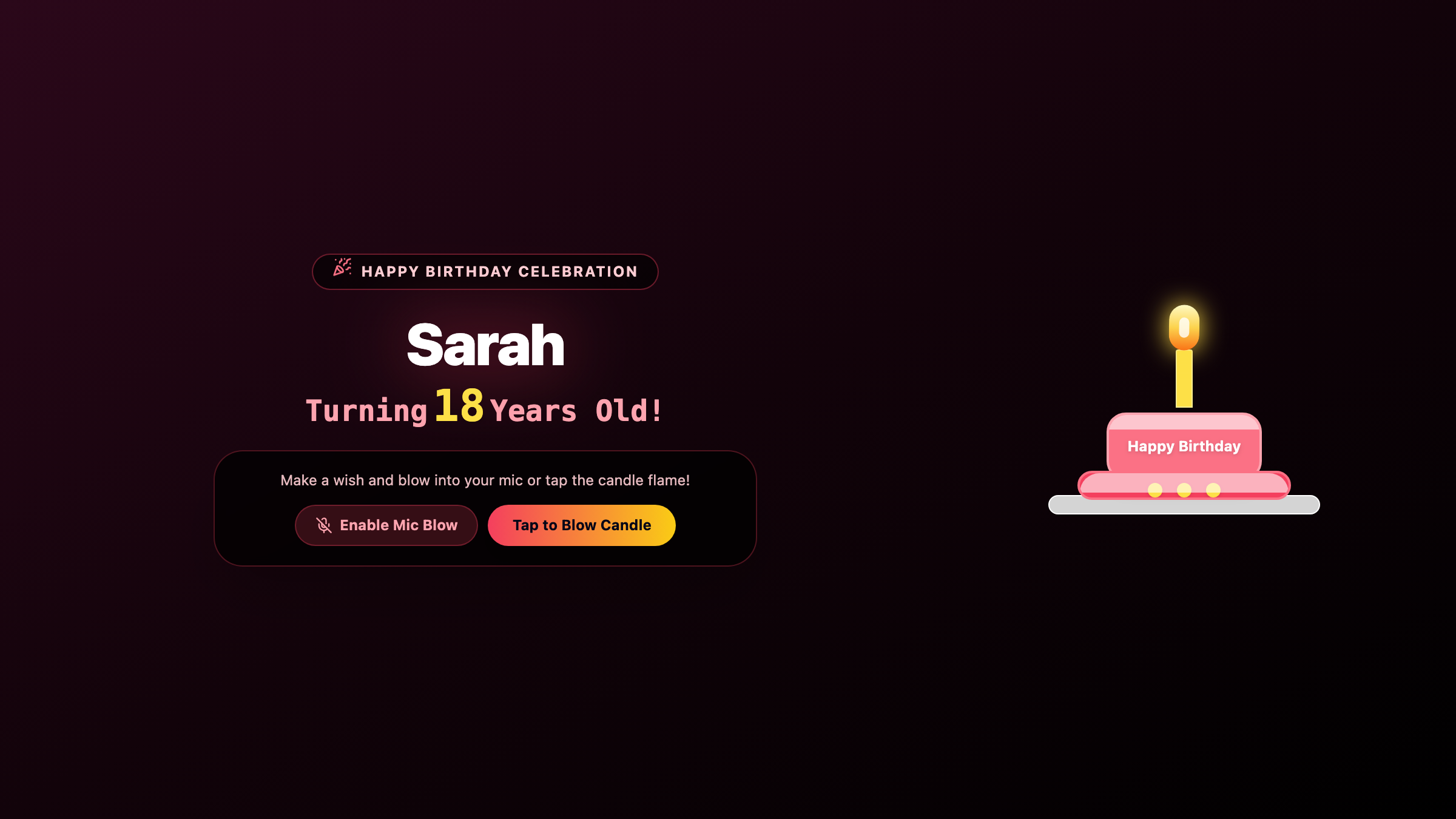
The Birthday Dilemma: When Real Candles Are Not an Option
Blowing out birthday candles is the quintessential milestone tradition. But in modern party settings, lighting actual wax candles can quickly become complicated:
- Strict Smoke Detector Venues: College dormitories, corporate office breakrooms, modern apartment buildings, and hotel rooms often have ultra-sensitive smoke alarms that trigger building evacuations.
- Toddler Safety: Young toddlers are easily frightened by real open flames, or worse, curious little hands reach out and risk nasty burns.
- Forgotten Matches or Last-Minute Cakes: You picked up cupcakes on the way to a gathering, but nobody remembered to bring candles or a lighter.
- Hygiene Concerns: Blowing forcefully over a communal cake shared by a dozen coworkers or friends has become an etiquette faux pas in post-pandemic gatherings.
Instead of skipping the candle-blowing ritual altogether, you can turn an old tablet or phone into an interactive birthday cake smart display.
With Updrawer’s Birthday Party Cake, you get the magical excitement of blowing out glowing candles—complete with interactive microphone detection, cheer melodies, and a joyful explosion of confetti.
What Makes an Interactive Digital Birthday Cake So Fun?
1. Real Blow-Out Physics via Microphone
When it is time for the birthday wish, the celebrant leans close to the tablet and blows a gentle gust of air towards the device. The web application’s audio-sensing engine detects the puff of breath through the microphone and instantly extinguishes the flickering digital flames one by one.
(Prefer not to use the microphone? Guests can also tap the candles on the touchscreen to blow them out.)
2. Joyful Confetti Explosions & Birthday Music
The moment the last candle flame goes out:
- Colorful confetti canons burst across the entire screen.
- A cheerful Happy Birthday celebratory tune chimes through the tablet’s speakers.
- Warm cheering messages light up the display.
3. Fully Personalized for Every Age
You can tailor the cake in seconds:
- Put the birthday star’s name front and center (“Happy 21st Birthday, Emma!” or “Cheers to 30 Years, Liam!”).
- Select exact candle numbers or multi-tier cake decorations.
- Choose cake flavors and icing styles ranging from strawberry pastel to rich chocolate gold.
4. Zero App Store Downloads or Account Setup
You do not need to install heavy party apps or log into accounts on an old phone. The cake runs instantly inside any modern or legacy mobile web browser.
4 Easy Steps to Set Up Your Party Centerpiece
Step 1: Power On and Connect Your Old Screen
Retrieve an old iPad, Galaxy Tab, or spare phone from your drawer. Plug in a portable power bank or charging cable so the party never runs out of juice.
Step 2: Open the Smart Display in Safari or Chrome
Navigate straight to: https://updrawer.com/app/birthday-blow-candle
The festive cake interface loads immediately on your screen.
Step 3: Customize the Celebrant’s Details
Tap the settings button to:
- Enter the celebrant’s name (e.g., Emma).
- Choose the age or candle count.
- When prompted by the browser, tap “Allow” for microphone access so the candle responds to real breath.
Step 4: Add to Home Screen and Mount on the Dessert Table
Tap Share $\rightarrow$ “Add to Home Screen” to hide the browser bar. Place the tablet on an acrylic or wooden stand right next to the dessert platter, party cupcakes, or cocktail glasses.
When everyone gathers to sing the birthday song, place the screen right before the birthday star and let them make their wish!
Great Occasions to Use Your Upcycled Birthday Cake
- Office Celebrations: Surprise your coworker at their desk without needing to sneak lighters past building security.
- Dorm Room Parties: Celebrate birthdays in college residences without the dreaded 2 AM fire alarm drill.
- Kids & Toddlers: Let little ones practice blowing out candles again and again without any risk of fire or melted wax on the floor.
- Virtual FaceTime & Zoom Calls: Prop the interactive cake beside your webcam during remote celebration calls so long-distance family members can virtually blow out their candles together.
Upcycle that dusty old screen into a reusable celebration hero that brings smiles to every party!
Further Reading & Sustainable Party Ideas
- Zero-Waste Party Alternatives and Tech Upcycling, GSMA Sustainable Electronics Guide.
- Modern Celebration Rituals in Hybrid Communities, Frontiers in Psychology.
- DIY Interactive Party Displays with Recycled Hardware, Instructables Community Projects.
Related Articles
I Tried 30 Days of Slow Living With My Desk. Here's What Actually Changed.
A personal experiment inspired by Cal Newport's Digital Minimalism: 30 days of redesigning a workspace to remove friction and distraction. What worked, what didn't, and what stayed.
5 DIY Phone Stands You Can Make Right Now From Things Already in Your Home
You don't need to buy anything. These five clever phone stand ideas use materials most people already have at home — and they work surprisingly well for repurposed desk displays.
Rescue Your Old Phone From the Drawer
Don't let your old device gather dust. Turn your longtime companion into an aesthetic desk clock, calendar & smart display with just one click.